Ceci est une ancienne révision du document !
Using docker with GPU
Docker is a tool designed to make it easier to create, deploy, and run applications by using containers. Containers allow a developer to package up an application with all of the parts it needs, such as libraries and other dependencies, and ship it all out as one package
In this tutorial we will learn how to use docker with GPU by running a simple Tesnforflow program.
Terminologies
- docker: the main command to run docker
- nvidia-docker a wrapper around docker to run docker containers on GPU
- Docker Image : a file containing OS system and software
- Docker container : an instance of image
We will the latest TF GPU images. Firts we check if the image exist locally:
$ docker images
...
tensorflow/tensorflow       latest-gpu          85020a337138        2 days ago
5.63GB
...
We can pull the image if it doesn't exist :
$ docker pull tensorflow/tensorflow:latest-gpu
Before running a container, we suppose that we have a folder named app containing our tensorflow program.
$ ls .
app
Lets open a shell within the container:
$ nvidia-docker run -it --rm tensorflow/tensorflow:latest-gpu
root@af31168ce2e5:/notebooks#
Woot! we gain root shell inside the container!
- -it means interactive
- – rm means delete the container when finished
Newt we try to list files inside the container:
root@af31168ce2e5:/notebooks#ls
1_hello_tensorflow.ipynb  2_getting_started.ipynb  3_mnist_from_scratch.ipynb  BUILD  LICENSE
These files are inside the containers. Host files (app folder) are not visible inside the container. We will see later how to expose theme.
We can run directly python shipped withe container:
$ nvidia-docker run -it --rm tensorflow/tensorflow:latest-gpu python
Python 2.7.12 (default, Dec  4 2017, 14:50:18)
[GCC 5.4.0 20160609] on linux2
Type "help", "copyright", "credits" or "license" for more information.
>>> import tensorflow as tf
Lets try to access to our folder app inside the container:
$ nvidia-docker run -it --rm  -v app:/app tensorflow/tensorflow:latest-gpu bash
# ls /app
tfexample.py
-vmeans bindapplocal folder to/appfolder inside the container.
Now, we can run directly our tfexample.py inside the container:
$ nvidia-docker run -it --rm -v app:/app tensorflow/tensorflow:latest-gpu python /app/tfexample.py
By default this image run jupyter notebook if no program is given. BUT we need to expose the used port 8888 with -p8888:8888
nvidia-docker run -it --rm  -v app:/app -p8888:8888 tensorflow/tensorflow:latest-gpu
[I 14:51:49.222 NotebookApp] Writing notebook server cookie secret to /root/.local/share/jupyter/runtime/notebook_cookie_secret
[I 14:51:49.250 NotebookApp] Serving notebooks from local directory: /notebooks
[I 14:51:49.250 NotebookApp] The Jupyter Notebook is running at:
[I 14:51:49.250 NotebookApp] http://(2e138bde19ec or 127.0.0.1):8888/?token=1ee0827bc46d36131d839532a30a771e5ae9125607b84521
[I 14:51:49.250 NotebookApp] Use Control-C to stop this server and shut down all kernels (twice to skip confirmation).
[C 14:51:49.250 NotebookApp]

    Copy/paste this URL into your browser when you connect for the first time,
    to login with a token:
        http://(2e138bde19ec or 127.0.0.1):8888/?token=1ee0827bc46d36131d839532a30a771e5ae9125607b84521
Replace 127.0.0.1 by mesodgx.univ-fcomte.fr and open the URL in the navigator. A notebook will be opened. In this example the URL is http://mesodgx.univ-fcomte.fr:8888/?token=1ee0827bc46d36131d839532a30a771e5ae9125607b84521
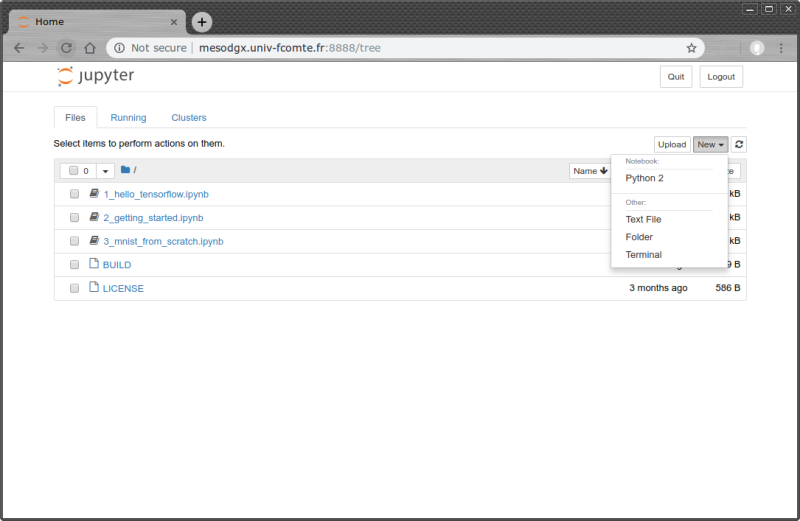
One can the open and run notebook files. For more information about how to use Jupyter notebook please visit this page:Jupyter NoteBook