Ceci est une ancienne révision du document !
Jupyter Notebook (IPython)
The Jupyter Notebook is an open-source web application that allows you to create and share documents that contain live code, equations, visualizations and explanatory text. Uses include: data cleaning and transformation, numerical simulation, statistical modeling, machine learning and much more.
This tutorial explains the setup to run an Jupyter (IPython) Notebook on a computing node on the Lumiere cluster at the MesoFC Supercomputer Center and forward the port encrypted with SSH to the browser on a local laptop.
How to?
- Connect to mesocentreFC login node (mesologin1.univ-fcomte.fr)
- Within
WORKdirectory run the commandjupyer_notbook - Check if the job is running
$ qstat - Look at jupyter_$jobid.log SGE output file, if no errors the output looks like:
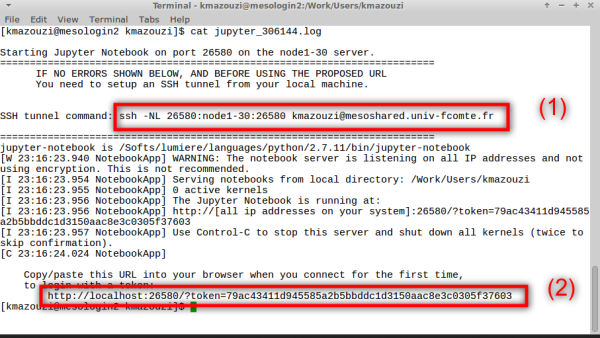
- From your local machine, run the command (1) to establish a secure tunnel
- And finally, use your browser to connect to your nootbook session like in (2)


Features
- We use python 2.7.11 (if you really need python 3) contact us
- By default, the
jupyter_notbookrequest 1 core and 2G of memory. - The session time is 2h
- Uses
all.qSGE queue - Because HOME directory is Read only in computing node, we use WORK as home directory for this session.
One can override these values by requesting resources like in SGE script.
For example :
request 4G of memory and wall time 4houres
# jupyter_notebook -l h_vmem=4G -l hr_t=4:00:00
request 1 GPU and 10g of memory
# jupyter_notebook -q tesla.q