Ceci est une ancienne révision du document !
Jupyter Notebook (IPython)
The Jupyter Notebook is an open-source web application that allows you to create and share documents that contain live code, equations, visualizations and explanatory text. Uses include: data cleaning and transformation, numerical simulation, statistical modeling, machine learning and much more.
This tutorial explains the setup to run an Jupyter (IPython) Notebook on a computing node on the Lumiere cluster at the MesoFC Supercomputer Center and forward the port encrypted with SSH to the browser on a local laptop.
How to?
- Connect to mesocentreFC login node (mesologin1.univ-fcomte.fr)
- Within
WORKdirectory run the commandjupyer_notbook - Check if the job is running
$ qstat - Look at jupyter_$jobid.log SGE output file, if no errors the output looks like:
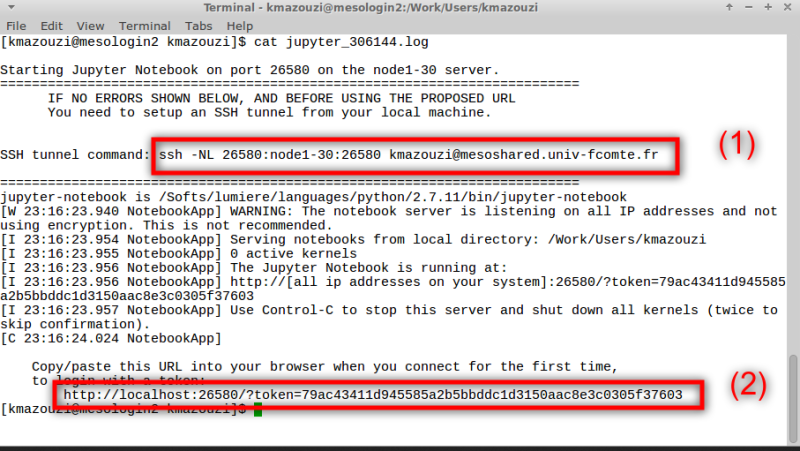
- From your local machine, run the command (1) to establish a secure tunnel
- And finally, use your browser to connect to your nootbook session like in (2)


Features
- By default, the
jupyter_notbookrequest 1 core and 2G of memory. - The session time is 2h
- Uses
all.qSGE queue
One can override these values by requesting resources like in SGE script.
For example :
request 4G of memory and wall time 4H
$ jupyter_nootbook -l h_vmem=4G -l hr_t=4:00:00